AI-native construction software for general contractors

Win More Work Without Adding More Work.

Stop passing on projects you could win. Korus automates repetitive estimating, subcontractor bidding, and field-to-office coordination so your team can bid more projects, catch potential scope gaps early, and spend less time on administrative work.

Just want to try estimating? Try AI Estimating Free

Korus reads a plan set, finds the trades and sends bid requests to vendors. Sample project.

Your Team Can Only Bid So Much. Your Business Shouldn't Stop Growing Because of It.

Every new project opportunity means reviewing drawings, organizing trade scopes, contacting subcontractors, chasing bids, and comparing proposals. Meanwhile, field reporting and billing create even more manual coordination. Korus takes on repetitive work so your existing team can handle more opportunities without adding administrative overhead.

Without Korus

  • Estimators spend days reviewing drawings and organizing trade scopes.
  • Bid invitations, vendor responses, and follow-ups require hours of manual coordination.
  • Subcontractor proposals contain different exclusions and missing scope items.
  • Field progress must be relayed between superintendents, PMs, and the office.
  • Billing teams spend time gathering completed-work information.

With Korus

  • AI-assisted plan analysis generates an initial estimate organized by trade.
  • Send invitations, track responses, and organize subcontractor proposals in one workflow.
  • Compare proposals and identify potential scope gaps before award.
  • AI-assisted daily logs keep field updates connected to project records.
  • Connected field records and approved changes help teams prepare billing.

Three steps

From Plans to Bids to Billing—Without the Manual Handoffs.

One connected construction workflow, from AI estimating and subcontractor bidding to jobsite reporting and billing.

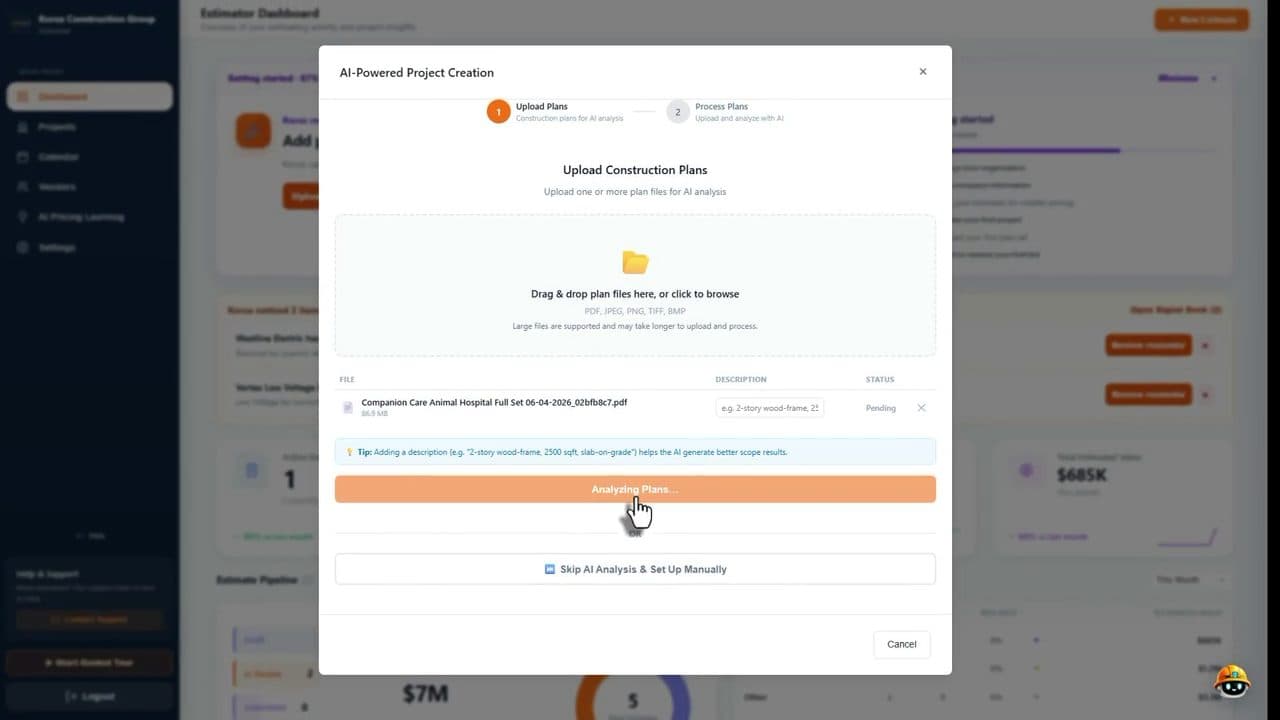
  1. Korus upload screen where a general contractor adds a plan set to start a new estimate

    Upload Plans. Generate an Initial AI Estimate.

    Upload construction drawings and let Korus organize project requirements and trade scopes.

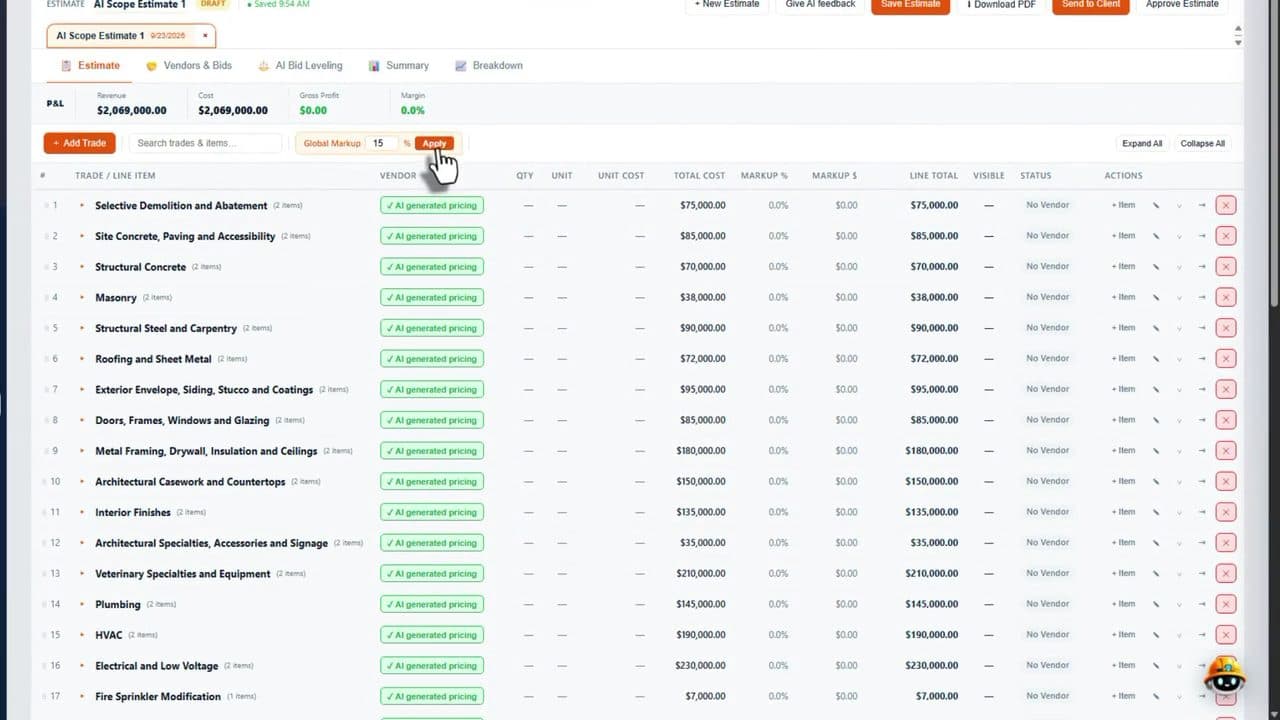
  2. Korus estimate screen showing scope items and costs grouped by trade

    Manage Subcontractor Bids. Catch Scope Gaps.

    Send bid invitations, track vendor responses, compare proposals, and identify potential exclusions.

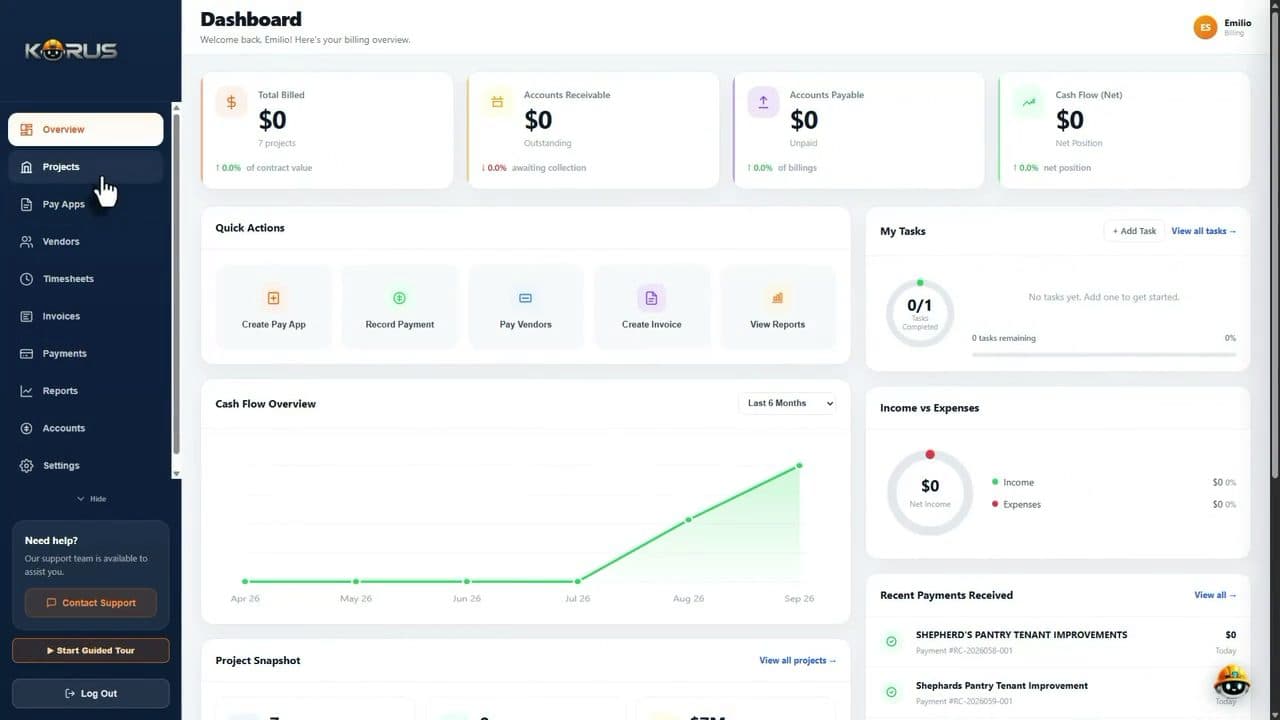
  3. Korus project page with contracts, budget and financial summary for a construction job

    Capture Field Progress. Keep Billing Moving.

    Document daily progress and keep project information connected across the field, PMs, and billing team.

One Construction Management Platform for the Teams That Build, Track, and Deliver Projects.

Estimating, bids, project management, field work and accounting share one set of project data.

01AI estimating

Bid More Projects. Catch Scope Gaps Before They Cost You.

Upload construction drawings and let Korus generate an initial estimate organized by trade. Review scope, identify potential missing coverage, and increase estimating capacity without starting every project from scratch.

  • Finds the trades and scope items in your plan set
  • Builds a line-item estimate by trade
  • Flags scope that nobody has priced yet
02Subcontractor bidding

Stop Chasing Subcontractors. Start Winning More Bids.

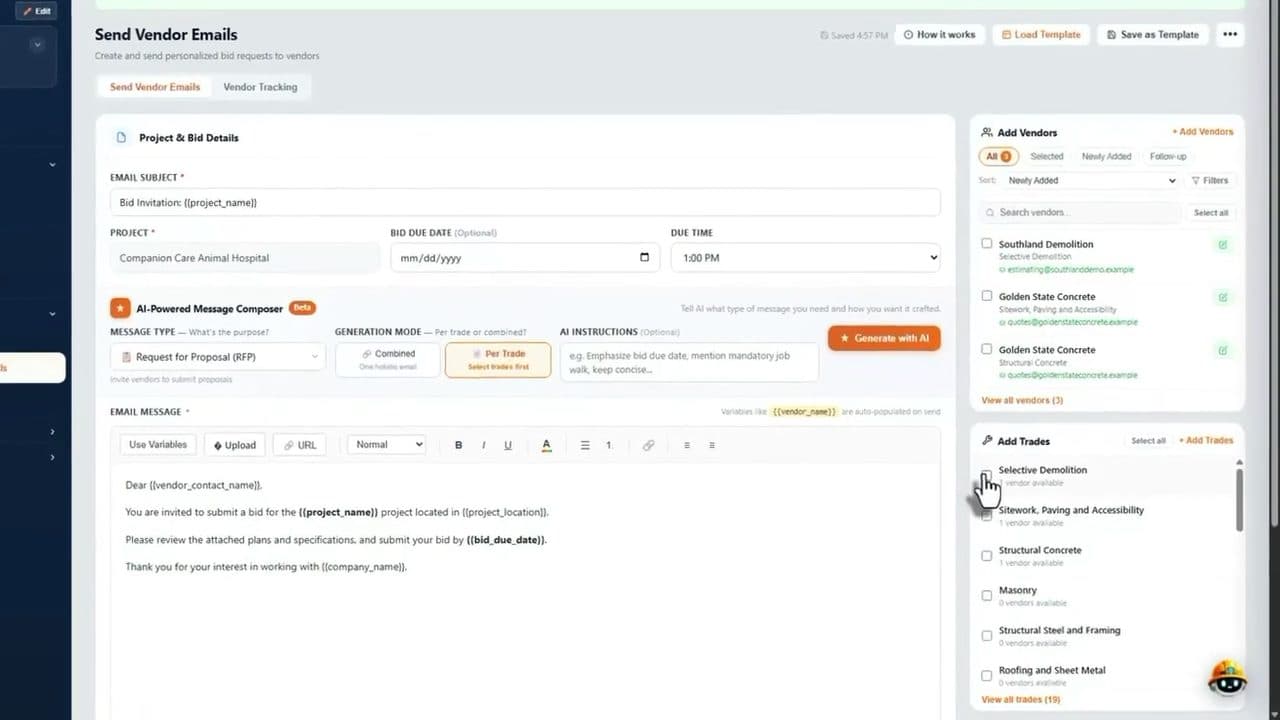
Send subcontractor bid invitations, track vendor emails, organize proposals, and compare scope and pricing in one connected workflow. Spend less time coordinating bids and more time evaluating opportunities.

  • Email a bid package to every vendor you choose
  • Collect bids by trade and compare them line by line
  • See which trades still have no bid
Korus Send Vendor Emails screen with a bid request email and a list of vendors by trade

03Project management and dashboards

Keep Projects Moving Without Adding More Admin.

Manage contracts, RFIs, change orders, and project updates in one workspace so project managers spend less time searching for information and coordinating repetitive tasks.

  • Contracts, RFIs, submittals and change orders per project
  • Budget and contract status at a glance
  • One dashboard across all your jobs

04Field teams

Turn Jobsite Updates Into Actionable Progress.

Capture photos, voice notes, daily logs, and project updates from the field. Give project managers and the office visibility without repeated reporting.

  • Daily logs with photos and voice notes
  • Punch lists and delay tracking
  • Timesheets from the crew

05Accounting and billing

Get From Completed Work to Billing Faster.

Keep pay applications, approved changes, costs, and field documentation connected to reduce the manual coordination required for construction billing.

  • Pay apps and invoices checked against the budget
  • Cost codes and committed costs by project
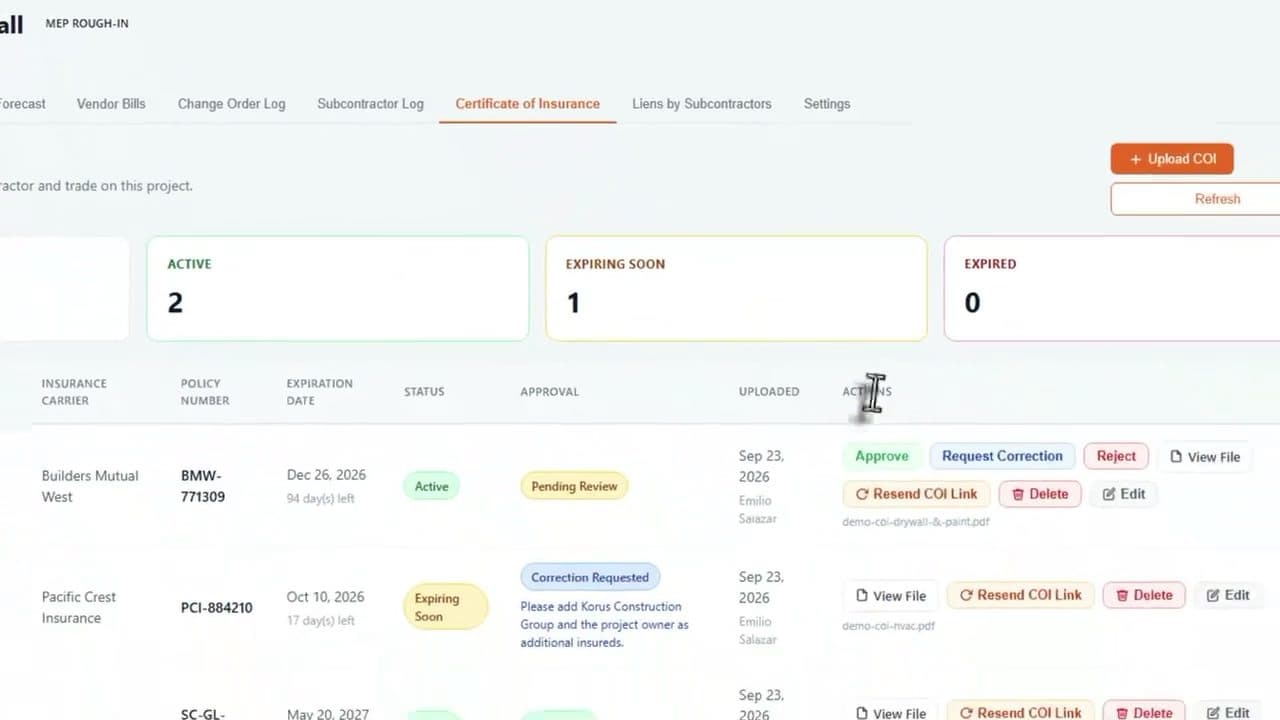
  • Certificates of insurance tracked with expiry dates
Korus certificate of insurance tracker showing active, expiring and expired policies for a project

See Korus end to end

See How Korus Takes Manual Work Off Your Team's Plate.

Follow a construction project from AI plan analysis and subcontractor bidding to field updates and billing-ready progress.

  • Upload plans
  • Estimate
  • Send bids
  • Run the project
  • Field work
FAQ

Questions Construction Teams Actually Ask.

Korus is built for the messy reality of construction — changing drawings, missing scope, vendor bids, field updates, cost movement, and decisions spread across too many tools.

Korus automates the repetitive parts of preconstruction. AI reads construction drawings, organizes scope by trade and generates an initial estimate, and Korus helps send bid invitations and track vendor responses. Your existing team can prepare more bids with less manual effort, while estimators still review the work and make the decisions.

Yes. Korus looks for missing work, exclusions and risks across your plans and bid documents so you can resolve them before you submit a number. It cannot remove every project risk, but it helps your team catch gaps earlier.

Korus sends bid packages to the vendors you choose, tracks vendor email activity and automatically reminds vendors to submit their quotes. Your team spends less time chasing subcontractors and more time evaluating the bids that come back.

Yes. Korus compares subcontractor bids side by side and helps flag missing work, exclusions and risks, so you can evaluate bid coverage before you award the work.

Superintendents capture photos, voice notes and progress from mobile, and Korus helps create organized daily logs. Project managers see field updates without waiting for reports, and accounting can reference connected project records when preparing pay applications.

Yes. Korus is particularly useful for general contractors who receive construction plans, coordinate subcontractor pricing, compare proposals, and manage projects through completion. It helps reduce the manual coordination involved in that workflow, whether you have an in-house estimating team or rely heavily on subcontractor bids.

Korus is not just a place to store project updates. It connects estimating, field activity, project management, and accounting so the information behind every decision stays tied together. A daily log, vendor bid, RFI, invoice, or budget change does not live in isolation — Korus keeps the context connected across the project.

Yes. Korus is designed to support the preconstruction stage, especially estimating. It helps teams organize scope, compare vendor bids, detect missing coverage, and understand risk before the project starts. The goal is to catch gaps before they become change orders, budget misses, or margin loss.

Korus helps estimators move from scattered plans, spreadsheets, vendor emails, and bid documents into a cleaner workflow. It can assist with plan reading, scope organization, trade breakdowns, vendor bid comparison, missing scope detection, and bid coverage review.

Korus gives PMs one connected place to track RFIs, tasks, schedules, budgets, change orders, client updates, and project decisions. Instead of chasing context across emails, meetings, spreadsheets, and field notes, PMs can see what changed, who updated it, and how it affects the project.

Yes. Korus is built to make field updates easier, not harder. Superintendents and field teams can capture daily logs, site photos, voice notes, punch items, delays, and field issues from mobile. The office gets better visibility without forcing the field to write long reports at the end of the day.

When a field issue, delay, photo, or daily log is captured, Korus keeps it connected to the project context. That means PMs, estimators, and accounting teams can understand what happened onsite and how it may affect scope, schedule, cost, or client communication.

Contact Korus

What's Keeping Your GC From Taking On More Work?

Tell us where your team spends the most time on manual work. We'll show you how Korus can help increase bidding capacity, simplify subcontractor coordination, and connect field updates with the office.

Let's talk about your workflow.

Whether your biggest pain is missed scope, scattered RFIs, slow daily logs, disconnected vendor bids, or unclear cost movement, Korus is built to help construction teams bring everything into one place.

  • See how Korus connects bid day to closeout
  • Walk through estimating, field, PM, and accounting workflows
  • Discuss your current tools, spreadsheets, and manual processes
  • Find where AI can reduce chasing, rework, and missed context

Estimating

Scope, bids, coverage

Field

Logs, photos, issues

Cost

Invoices, budgets, risk

Built for construction teams that are growing beyond spreadsheets, email threads, and disconnected tools.

Request a Korus Demo

Share a few details and we'll get back to you.

No pressure. Just a practical conversation about your construction workflow.