Step 1
Send bids without losing track
Pick vendors by trade, generate a personalized bid invitation and send it. Korus tracks who opened, who replied and which trades still have nobody pricing them.
Bid management software →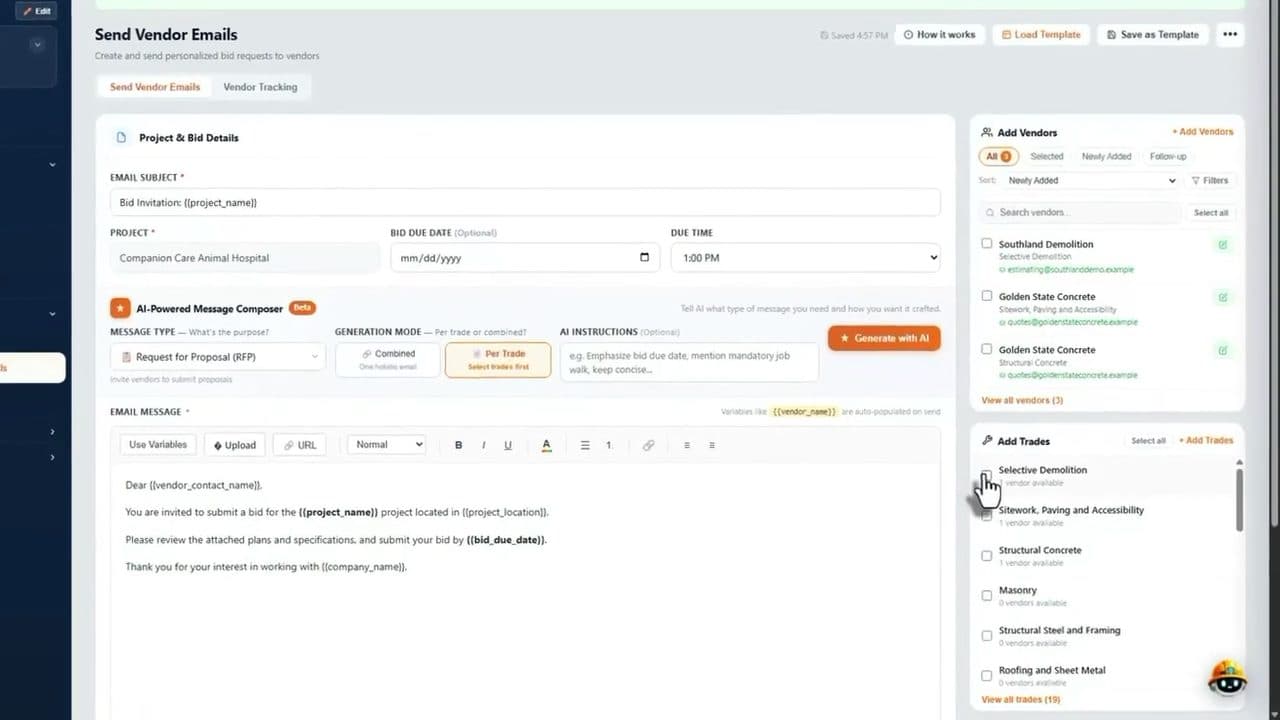
Construction projects are not task lists. They are plan sets, subcontractor bids, contracts, daily logs and pay applications that all depend on each other. This page explains what project management software for construction projects should do, and how Korus does it.
The gap
A task board is a fine place for to-dos. The trouble starts when the money, the paperwork and the field record end up somewhere else. Here is where the gap shows up.
| What a construction project needs | Generic task tool | Korus |
|---|---|---|
| Read plans and build scope by trade | Done by hand in separate files | AI plan reading organizes scope by trade |
| Send bids and compare subcontractors | Email and spreadsheets | Bid emails, vendor tracking and side-by-side comparison |
| Track contracts and signatures | A task or a note | Contract status by trade, with e-signature |
| Manage change orders | Comments on a task | Tracked from request to approval |
| Bill against the budget | Not covered | Pay apps, cost codes and committed costs |
| Keep subcontractor insurance current | Not covered | COI tracking with expiration dates |
| Capture field progress | Free-text updates | Daily logs, photos, voice notes and punch lists |
Buyer's checklist
Construction projects are priced and built by trade. The software should organize scope, bids and contracts the same way.
Look for bid packages, vendor tracking, reminders and a way to compare proposals and exclusions before you award work.
You should see which contracts are signed and follow each change order from request to approval.
Photos, voice notes and daily logs from a phone, with no long forms at the end of the day.
Billing should draw on the same project record as the contract and the cost codes, not a separate system.
Estimating, field and accounting data should connect so nobody re-enters the same information.
Dashboards that show contract status, budget and activity across every job, not just one.
AI should take on repetitive reading and summarizing, while your team reviews and decides.
Interactive
Tick every statement that sounds familiar. Nothing is sent or stored.
Your fit score
0 / 8
Your current setup covers most of these. Revisit when the number of active projects or subcontractors grows.
Talk it through in a demoIn the product
Step 1
Pick vendors by trade, generate a personalized bid invitation and send it. Korus tracks who opened, who replied and which trades still have nobody pricing them.
Bid management software →Step 2
See each subcontract as sent, accepted or pending, send reminders to everyone who has not signed, and keep their insurance certificates current.
Contract signing software →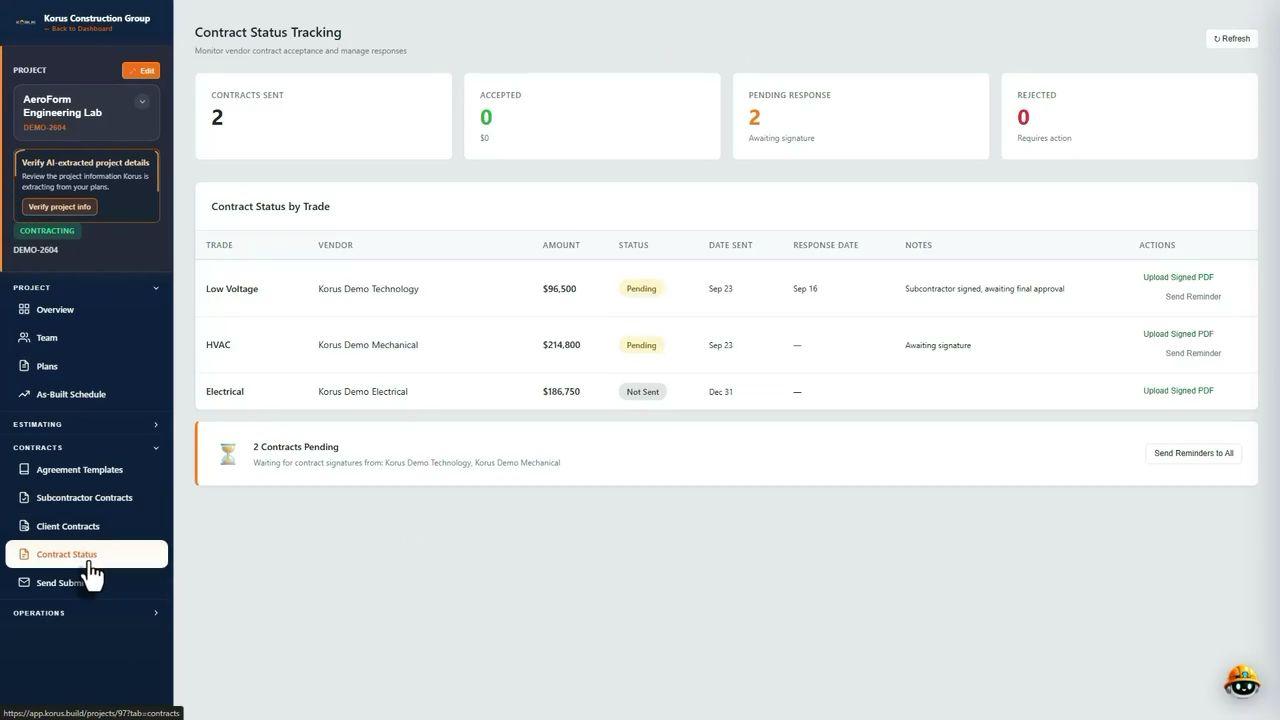
Step 3
Superintendents record the day with photos and notes. The log is saved to the project and summarized so project managers see progress without calling the site.
Daily log software →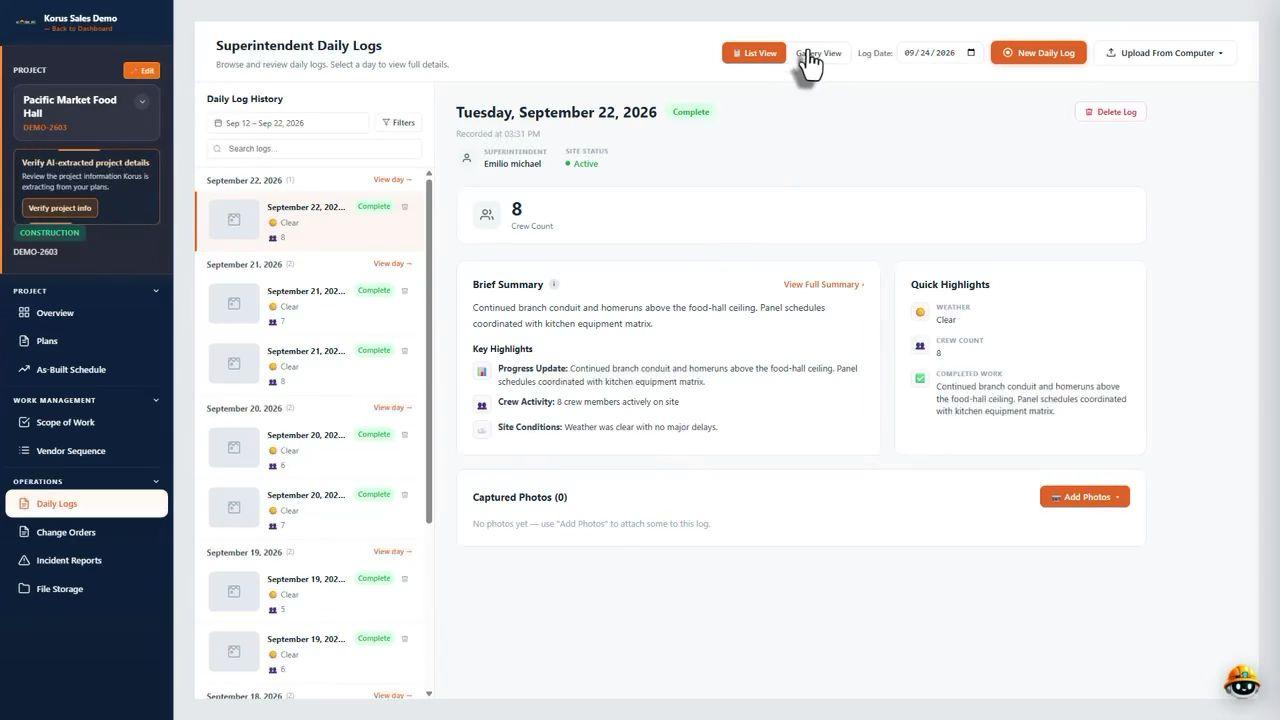
Fits how you build
Each project starts from its own plan set, so the trades, bids, contracts, logs and billing reflect the real scope.
FAQ
At minimum: bid and subcontractor management, contracts and change orders, daily logs and punch lists, budgets and pay applications, and a single place to see the status of every project. Construction-specific software also handles things generic tools do not, such as scope by trade, bid comparison and subcontractor insurance.
A task board is fine for to-do lists, but construction projects add bidding, subcontracts, change orders, retainage and field documentation. Teams that rely on a task board usually end up running the money and the paperwork in spreadsheets and email, which is where information gets lost.
List the workflows that cost you the most time today, then check whether the software handles each one end to end. Ask to see a real project, not a slide deck, and check that field updates, contracts and billing share the same project record. The fit check on this page turns those questions into a quick score.
Yes. Projects are set up from your plans, so a commercial build, a renovation or a tenant improvement each get their own trade scope, bids, contracts, logs and billing in Korus.
Subcontractors receive bid invitations by email and Korus tracks their responses and reminds them automatically. Contracts can be signed in the platform, and clients can follow progress through a client portal, so the people outside your office do not need a long onboarding.
It depends on the size of your team and how many projects you run. Book a demo and we will talk through the options for your company.
Bring a plan set or a current project and we will show you how the workflow runs in Korus.